> ## Documentation Index
> Fetch the complete documentation index at: https://docs.copyrocket.ai/llms.txt
> Use this file to discover all available pages before exploring further.
# 🔥 Trends Watch
Monitor trending topics from Google News and RSS feeds.
## Fetch Realtime Content From News
* Type your niche or core topic you want to track online
* For example AI, SEO, Dog health, Car Dashcam
* Click on search news
* You will find latest updated news as "Google News" Card.
## Add Feeds from Popular Sources
* Add Feeds from popular Sources in your niche
* For most cases its "url/feed.xml"
* If you don't know how then use the apps listed below.
## Apps to Fetch Feed URL
* [Chrome Extension](https://chromewebstore.google.com/detail/get-rss-feed-url/kfghpdldaipanmkhfpdcjglncmilendn?ref=copyrocket.ai): Just browse any website and get it's feed URL.
* [rssfinder.app](http://rssfinder.app) to find feeds URL from your Niche.
* [rss.app](http://rss.app) to find feeds URL from Social Media like Instagram, X, Linkedin and more.
## **🚀 Next Steps**
* **Tasks**: To manage task using our drag and drop simple kanban board.
* [**Autoblogging**](https://docs.copyrocket.ai/features/agents/autoblogging): Use our State of the Art Autoblogging Agent to get automated AEO, GEO Optimized content.
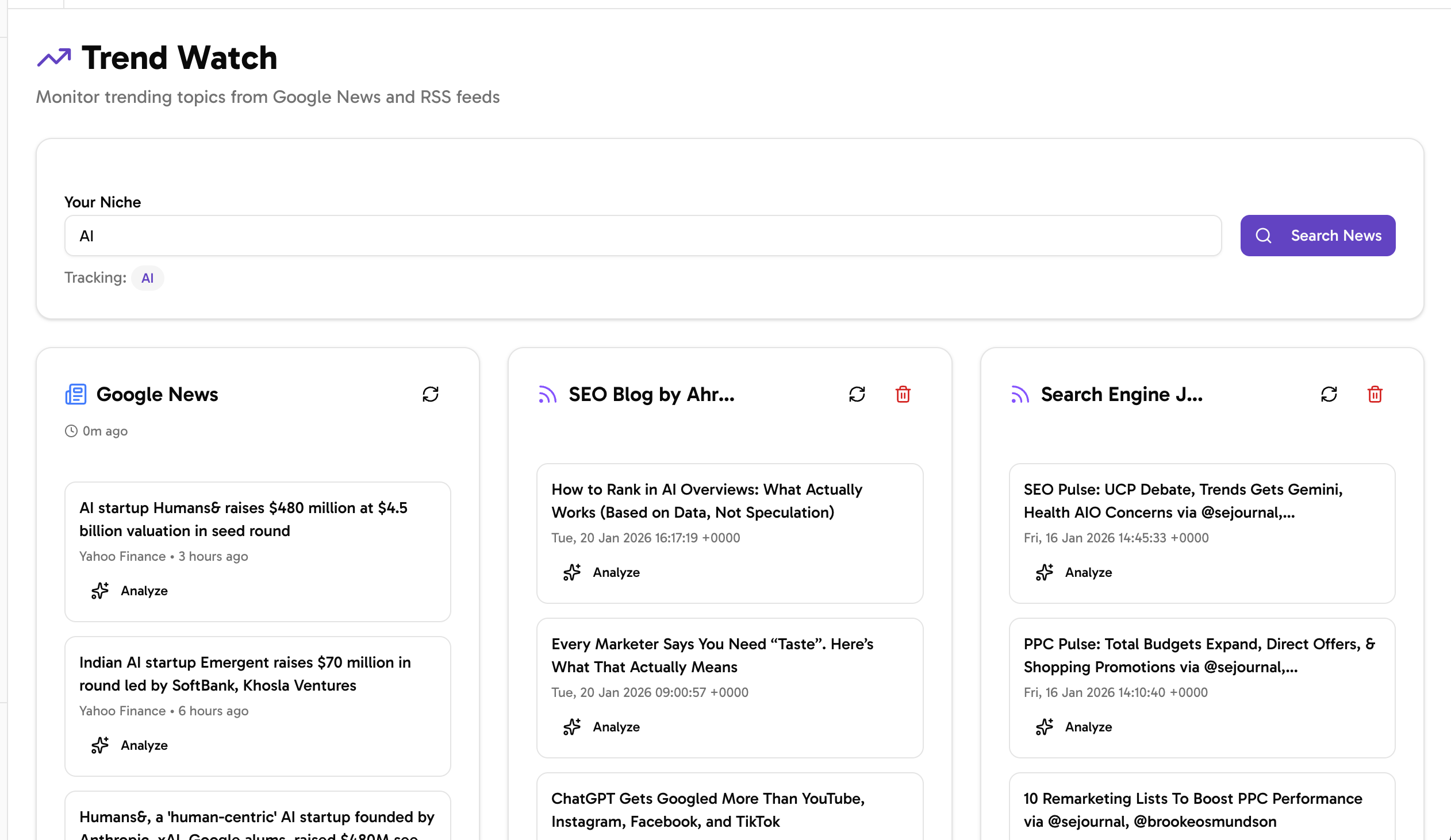 ## Fetch Realtime Content From News
* Type your niche or core topic you want to track online
* For example AI, SEO, Dog health, Car Dashcam
* Click on search news
* You will find latest updated news as "Google News" Card.
## Add Feeds from Popular Sources
* Add Feeds from popular Sources in your niche
* For most cases its "url/feed.xml"
* If you don't know how then use the apps listed below.
## Apps to Fetch Feed URL
* [Chrome Extension](https://chromewebstore.google.com/detail/get-rss-feed-url/kfghpdldaipanmkhfpdcjglncmilendn?ref=copyrocket.ai): Just browse any website and get it's feed URL.
* [rssfinder.app](http://rssfinder.app) to find feeds URL from your Niche.
* [rss.app](http://rss.app) to find feeds URL from Social Media like Instagram, X, Linkedin and more.
## **🚀 Next Steps**
* **Tasks**: To manage task using our drag and drop simple kanban board.
* [**Autoblogging**](https://docs.copyrocket.ai/features/agents/autoblogging): Use our State of the Art Autoblogging Agent to get automated AEO, GEO Optimized content.
## Fetch Realtime Content From News
* Type your niche or core topic you want to track online
* For example AI, SEO, Dog health, Car Dashcam
* Click on search news
* You will find latest updated news as "Google News" Card.
## Add Feeds from Popular Sources
* Add Feeds from popular Sources in your niche
* For most cases its "url/feed.xml"
* If you don't know how then use the apps listed below.
## Apps to Fetch Feed URL
* [Chrome Extension](https://chromewebstore.google.com/detail/get-rss-feed-url/kfghpdldaipanmkhfpdcjglncmilendn?ref=copyrocket.ai): Just browse any website and get it's feed URL.
* [rssfinder.app](http://rssfinder.app) to find feeds URL from your Niche.
* [rss.app](http://rss.app) to find feeds URL from Social Media like Instagram, X, Linkedin and more.
## **🚀 Next Steps**
* **Tasks**: To manage task using our drag and drop simple kanban board.
* [**Autoblogging**](https://docs.copyrocket.ai/features/agents/autoblogging): Use our State of the Art Autoblogging Agent to get automated AEO, GEO Optimized content.